
What this script sets up
install_mysql57_base_docker.sh is for hosts that already have Docker and need a stable MySQL 5.7 bootstrap path without preparing a separate Compose bundle first.
It keeps the database files, custom config, and optional initialization SQL under /data/mysql5.7 so the important state lives on the host instead of only inside the container.
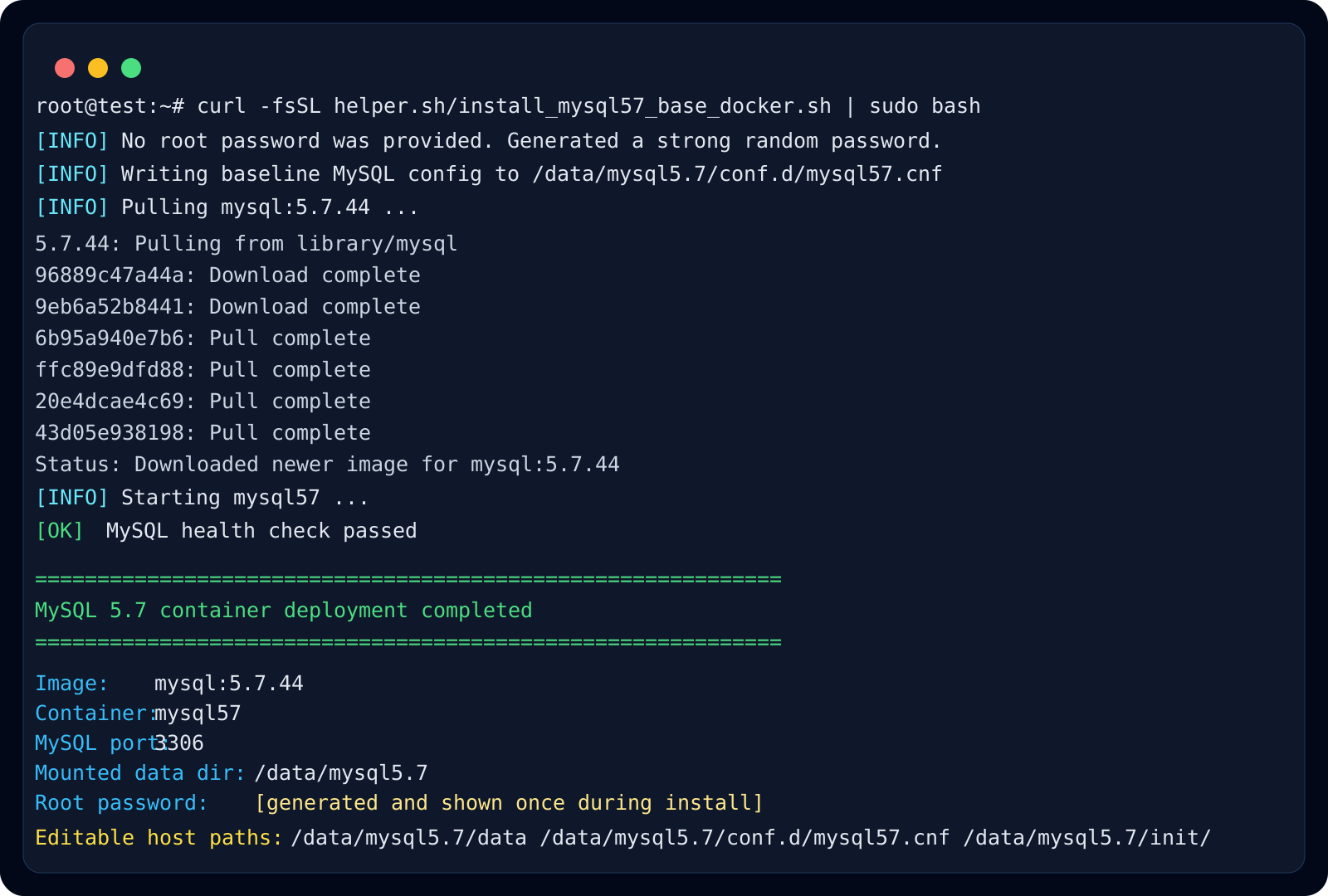
What it writes to /data/mysql5.7
The script creates data, conf.d, and init directories, then writes a baseline mysql57.cnf. If you do not provide a root password, it generates one and prints it after startup.
- /data/mysql5.7/data
- /data/mysql5.7/conf.d/mysql57.cnf
- /data/mysql5.7/init/
Where this pattern fits best
This pattern is useful for legacy applications, small internal systems, or migration rehearsal environments that still require MySQL 5.7 rather than a newer major version.
Because the database lives in a disposable container but keeps its state on the host, you can rebuild the container later without immediately losing your data directory.
Recommended checks after deployment
After the script finishes, confirm that the container is running, port 3306 is mapped as expected, and mysqladmin ping succeeds inside the container. Record the printed password before handing the instance to an application team.
- docker ps
- docker logs -f mysql57
- docker exec -it mysql57 mysqladmin ping -uroot -p
- docker exec -it mysql57 mysql -uroot -p